


Advanced PowerPoint Tips & Techniques Workshop

Workshop Details
Are you slides boring but you don’t know how to make them more creative, easily? Does it just take too long to make your slides? Do you have more text on your slides than all of the Game of Thrones books combined? In an effort to help you create better-looking, highly effective presentations efficiently. We are delighted to have Mr. Gautam Khattak (HKUST MBA 2013) to share his expertise in using “Advanced PowerPoint Skills”. This training is an interactive workshop focusing on content design, tailoring to fit your audience and content delivery for more engaging and effective presentations.
Course objective and outline
This class is a workshop where you will learn tips, shortcuts and techniques to create visualizations in PowerPoint. This is an interactive workshop so you will actually be creating these items yourself. The class is applicable to anyone who creates presentations (Training, Customer, Internal Reviews, Executive).
Having already attended the “Design Better Presentations” class is not required. Laptops with PowerPoint (2013, 2016) installed is required.
Outline of topics
Using/Manipulating Shapes, SmartArt, Transitions, Picture & Text manipulation, Alignment & Spacing, Embedding Objects including Excel worksheets, using hyperlinks in presentations, Animations, Slide Master, Selection Tool, and more.
About the Speaker
| Mr. Gautam Khattak is the Chief Information Officer for Artesyn Embedded Technologies. Gautam is skilled in presentation design, public speaking and has given his tips to over 1000 people. He was the President of two Toastmaster groups, helping participants improve their confidence in Public Speaking. He has extensive experience in public speaking to many different types of audiences. | 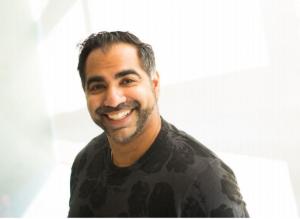 |
The workshop is on first-come first-served basis, but priority will be given to HKUST MBAAA Life Members.
Please send email to MBAAA for enquiries.
Jun
20
Jun
20
Food starts at: 18:30
Class: 19:00 - 22:00


